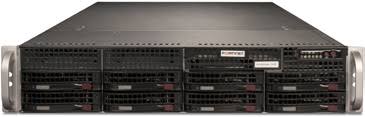
FortiManager
Manage all your Fortinet devices in a single-console central management system. FortiManager provides full visibility of your network, offering streamlined provisioning and innovative automation tools.
Integrated with Fortinet’s Security Fabric, the security architecture and FortiManager’s Automation Driven Network Operations capabilities provide a foundation to secure and optimize network security, such as provisioning and monitoring SD-WANs.

Orchestrate security devices and systems on-premise or in the cloud to streamline network provisioning, security policy updates & change management.

Automate your time-intensive processes and accelerate workflows to offload NOC-SOC, reduce administrative tasks and address talent shortages.

Optimize Visibility to the entire digital attack surface and awareness of increasing cyber threats from one centralized location, through accurate detection, automated correlation and rapid response features.
Key Features
Single console management
- Manage all Fortinet products, including firewalls, FortiAnalyzers, switches, wireless infrastructure and Endpoints
Centralized policy and device management
- Centrally manage up to 100,000+ devices and policies such as firewalls, switches, and access points
Zero-touch provisioning
- Automate workflows and configurations for Fortinet firewalls, switches and wireless infrastructure
Secure SD-WAN provisioning and monitoring
- Provision and monitor Secure SD-WAN from one console across your network, branch offices or campuses
Multi-tenancy and administrative domains (ADOMs)
- Separate customer data and manage domains leveraging ADOMs to be compliant and operationally effective
Security automation
- Reduces complexity and costs by leveraging automated REST API, scripts, connectors, and automation stitches
Enterprise-grade availability and integration
- Automated backups up to 5 nodes with streamlined software and security updates for all managed devices
Single Pane Automation and Orchestration
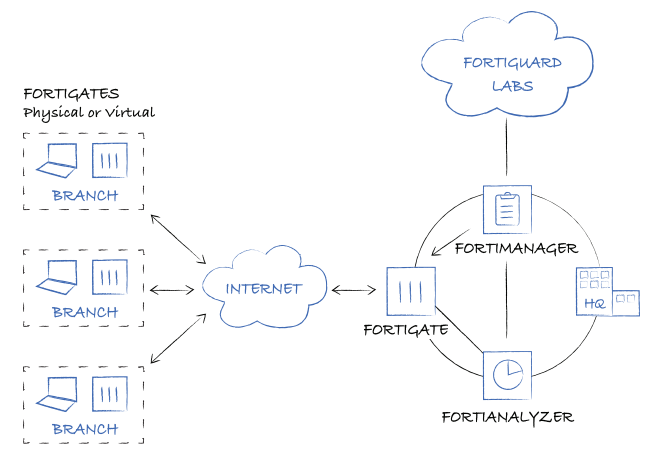
Fortinet Security Fabric delivers sophisticated security management for unified, end-to-end protection. Deploying Fortinet-based security infrastructure to battle advanced threats, and adding FortiManager to provide single-pane-of-glass management across your entire extended enterprise provides insight into network-wide traffic and threats.
FortiManager offers enterprise-class features to contain advanced threats. FortiManager also delivers the industry’s best scalability to manage up to 100,000 Fortinet devices. FortiManager, coupled with the FortiAnalyzer family of centralized logging and reporting appliances, provides a comprehensive and powerful centralized management solution for your organization.
Central Management of Network Infrastructure
Centrally manage FortiGate , FortiSwitch, FortiExtender, FortiAP. The VPN manager simplifies the deployment and allows centrallyprovisioned VPN community and monitoring of VPN connections on Google Map. FortiAP Manager allows configuring, deploying and monitoring FortiAPs from a single console with Google Map view. The FortiClient Manager allows centralized configuration, deployment and monitoring of FortiClients.
Centralized SD-WAN Deployment & Monitoring
Powerful SD-WAN management capabilities by using templates. Enhanced SD-WAN monitoring for each SD-WAN link member with visibility of link status, application performance, bandwidth utilization. The SLA targets are included in performance monitoring graphs for each WAN provider.
Configuration and Settings Management
Collectively configure the device settings - using the provisioning templates and advance CLI templates improves management of a large number of devices. Automatic device configuration backup with revision control and change audit make it easier for daily administrative tasks.
Security Policy Management
A set of commonly used security policies can be now grouped in a Policy Block and inserted as needed in different Policy Packages.
Global policy feature that allows companies such as: Telecom, MSSP, SAAS providers applies a header and/or footer policy at the ADOM level to all the policy packages or to a selection of packages, as needed.
API for Automation and Orchestration
RESTful API allows MSSPs/large enterprises to create customized, branded web portals for policy and object administration. Automate common tasks such as provisioning new FortiGates and configuring existing devices. Join Fortinet Developer Network (FNDN) to access exclusive articles, how-to content for automation and customization, community-built tools, scripts and sample code.
Multi-Tenancy & Role Based Administration
FortiManager equips admins with granular device and role based administration for deploying multi-tenancy architecture to large enterprises, with a hierarchical objects database to facilitate re-use of common configurations and serve multiple customers. The graphical interface makes it easy to view, create, clone and manage ADOMs. You can use ADOMs to manage independent security environments, each ADOM with its own security policies and configuration database. FortiManager enables you to group devices logically or geographically for flexible management, and the zero-touch deployment uses templates to provision devices for quick mass deployment and supports firmware version enforcement. Define global objects such as Firewall Objects, Policies and Security Profiles to share across multiple ADOMs. Granular permissions allow assigning ADOMs, devices and policies to users based on role and duties.
Monitor and Report for Deep Visibility
Access vital security and network statistics, as well as real-time monitoring and integrated reporting provides visibility into network and user activity. For more powerful analytics, combine with a FortiAnalyzer appliance for additional data mining and graphical reporting capabilities.
Integration & Security Fabric
Integration with ITSM to mitigate security events and apply configuration changes and policy updates. Seamless integration with FortiAnalyzer appliances provides in-depth discovery, analysis, prioritization and reporting of network security events. Create fabric connectors to facilitate connections with third-party vendors via pxGrid , OCI, ESXi and others, to share and exchange data. FortiManager’s workflow for audit and compliance enables you to review, approve and audit policy changes from a central place, including automated processes to facilitate policy compliance, policy lifecycle management, and enforced workflow to reduce risk for policy changes.
Network & Security Operations Visibility
Automated data exchanges between security (SOC) workflows and operational (NOC) workflows, creating a single, complete workflow that not only saves time, but also provides the capacity to complete additional incident response activities. FortiManager’s NOC-SOC delivers advanced data visualization to help Analysts quickly connect dots and identify threats, simplifying how organizations deliver security and remediate breaches, data exfiltration, and compromised hosts.